
Can You Share Final Fantasy Resonance on Switch?
Both Switch editions list family-group lending. See how digital Virtual Game Card loans work, what they need, and which hardware can run each edition.
FAQ
Can I lend Final Fantasy Resonance to a Nintendo family-group member?
Do I need Nintendo Switch Online to lend the game?
Can a Switch 2 owner play the borrowed Switch edition?
Can we play Final Fantasy Resonance together with one borrowed copy?
Can you lend Final Fantasy Resonance to family on Nintendo Switch?
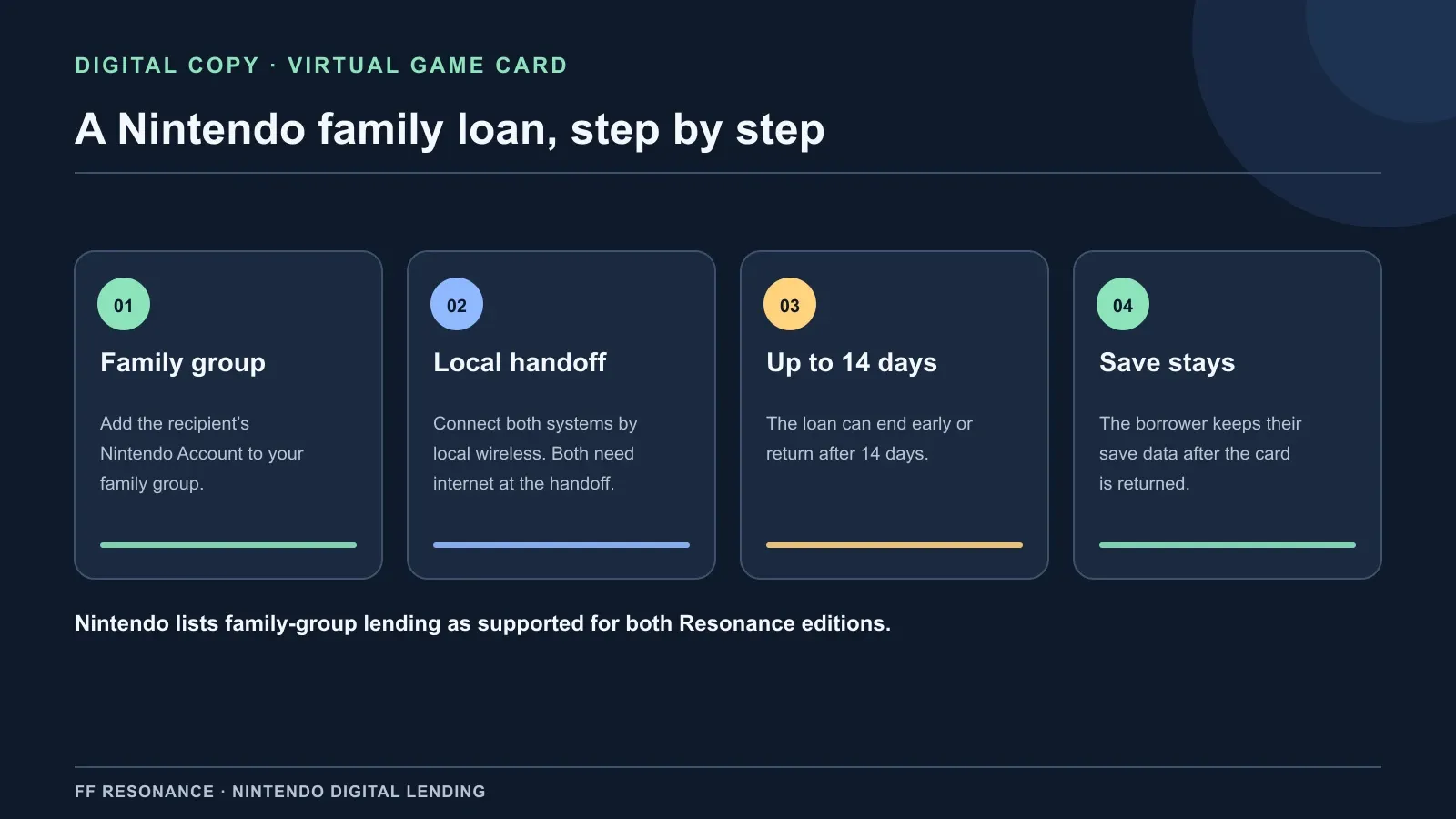
Yes. Nintendo’s U.S. store pages mark Nintendo Account family-group lending: Supported for both the Switch and Switch 2 editions of Final Fantasy Resonance. For a digital purchase, the loan uses Nintendo’s Virtual Game Card feature: both systems need an internet connection and must connect over local wireless when the card is lent. The loan lasts up to 14 days, and the borrower keeps their save data after returning it.
What the store listing confirms
The game’s lending field answers whether the Nintendo product is eligible for the family-group lending feature. It does not describe the borrowing steps, subscription needs, or edition compatibility, so those points come from Nintendo’s separate Virtual Game Card rules and product notes.
| Check | What Nintendo currently lists |
|---|---|
| Switch edition | Family-group lending is Supported. Its Switch 2 compatibility is also marked Supported, with behavior consistent with Switch. |
| Switch 2 edition | Family-group lending is Supported. The game is compatible only with Switch 2 hardware. |
| Loan route | A digital Virtual Game Card can be lent to a Nintendo Account family-group member. |
| Connection at handoff | The two systems connect over local wireless, and both must be online when lending. |
| Loan period | Up to 14 days; the borrower can return it earlier. |
| Borrower’s progress | Nintendo says the borrower keeps their save data after the Virtual Game Card is returned. |
| Save between editions | Nintendo says saves cannot be carried between the Resonance Switch and Switch 2 editions. |
The listing also marks each edition Single system (1). Family lending lets another account access a digital copy for a period; it does not turn the game into a multiplayer or co-op title.
How to lend the digital game
- Add the other account to your Nintendo Account family group. Nintendo allows a family group of up to eight Nintendo Account users. A family group is the account grouping used for this feature; it is not the same label as a Nintendo Switch Online family membership.
- Bring both consoles together. At the time you lend the Virtual Game Card, connect the consoles using local wireless and make sure both can reach the internet.
- Open Virtual Game Cards on the owner’s system. Choose the Final Fantasy Resonance card and the option to lend it to the family-group member. Follow the console prompts on both systems.
- Let the borrower download the game data. The digital card grants access to the selected edition; it does not change which console that edition supports.
- Return it when finished, or let the loan expire. Nintendo sets a maximum 14-day loan and says the borrower’s save data remains after the card is returned.
The lending instructions do not list Nintendo Switch Online as a requirement for this handoff. Nintendo’s store separately places Save Data Cloud under its Nintendo Switch Online section. Cloud backup and lending answer different questions; see our Nintendo Switch Online guide for the membership and save-backup boundary.
Which Switch edition can the borrower play?
Check the edition before you lend it. Nintendo sells two separate products, and their compatibility notes do not match.
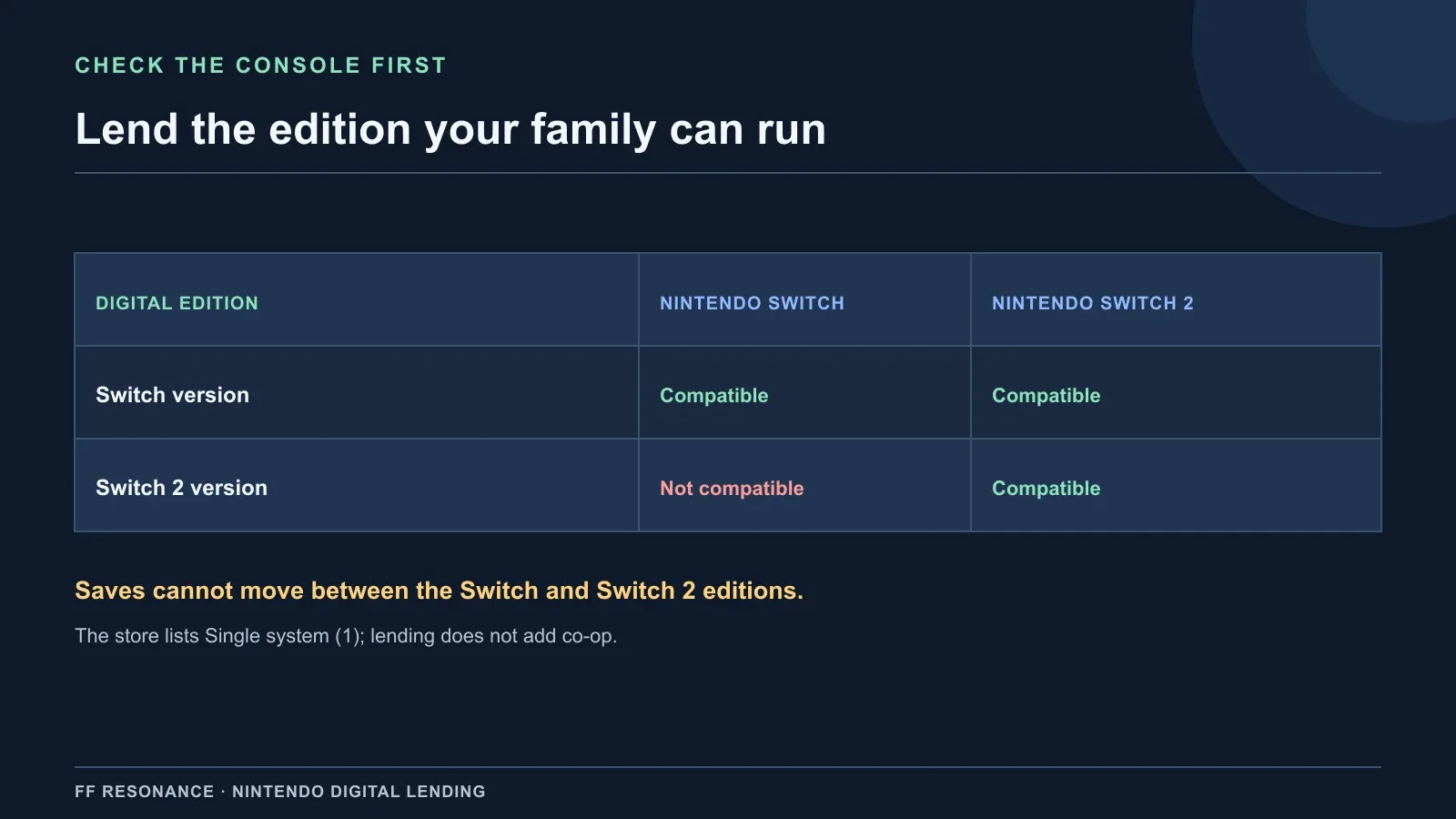
| Digital edition being lent | Original Switch | Switch 2 |
|---|---|---|
| Nintendo Switch version | Compatible | Nintendo marks compatibility supported, with behavior consistent with Switch |
| Nintendo Switch 2 version | Not compatible | Compatible |
The game’s save data also cannot move between the two editions. Lending the Switch copy to someone with Switch 2 hardware does not convert its save into a Switch 2-edition save. If you need the edition boundary or cloud-save details, read the Switch 2 compatibility guide and file-size comparison before choosing a digital product.
Does the family lending feature include the free demo?
Do not assume it does. Nintendo says Virtual Game Cards may not be available for demos. The Final Fantasy Resonance demo is a separate free product, and the store’s “Supported” family-group lending field is on the full-game product pages. Nintendo has not confirmed that the demo can be lent through this feature, so demo lending is To be confirmed.
Official sources checked October 17, 2026
- Nintendo U.S.: FINAL FANTASY RESONANCE for Nintendo Switch — family-group lending status, Switch 2 compatibility, player count, cloud-save listing, and cross-edition save notice.
- Nintendo U.S.: FINAL FANTASY RESONANCE for Nintendo Switch 2 — family-group lending status, supported hardware, player count, cloud-save listing, and cross-edition save notice.
- Nintendo: Virtual Game Cards — family group, local wireless and internet requirements, 14-day limit, save retention, and demo caveat.
- Nintendo Support: What Is a Nintendo Account Family Group? — family-group membership and up to eight accounts.
For the demo’s own transfer rules, see the demo save-transfer guide; that route moves your demo progress into a full-game copy and is separate from lending a digital game to another account.
Gallery
Related Articles
guides
How to Save in Final Fantasy Resonance
Find the manual save option on the field map and use save points in towns and dungeons.
guides
Final Fantasy Resonance New Game Plus: Cleared Save Explained
Find out what a cleared save does and what has been reported about New Game Plus in Final Fantasy Resonance.
guides
Final Fantasy Resonance Steam Save File Location on Windows
Find the Windows Steam demo and full-game save folders and understand what a local backup does.
Was this helpful?
Thanks for the feedback!