
Can You Play Final Fantasy Resonance on PS Portal?
The U.S. PlayStation Store lists PS Portal cloud streaming for Final Fantasy Resonance with Premium. Compare it with Remote Play from your PS5.
FAQ
Does Final Fantasy Resonance support PS Portal Cloud Streaming?
Can I use PS Portal without a PS5 for this game?
Does Remote Play require PlayStation Plus?
Is PS Portal the same kind of handheld as Nintendo Switch 2?
Can you play Final Fantasy Resonance on PS Portal?
Yes. The U.S. PlayStation Store lists Final Fantasy Resonance as a PS5 title with PS5 and PS Portal Cloud Streaming supported only with PlayStation Plus Premium. PS Portal also supports Remote Play from compatible games installed on a PS5, but that route needs your PS5 to run as the host. Sony says Remote Play itself does not require PS Plus. The store does not spell out whether your region launches this title from the Premium catalog or an eligible digital-library copy, so check the Portal game tile before subscribing; that exact license path is To be confirmed.
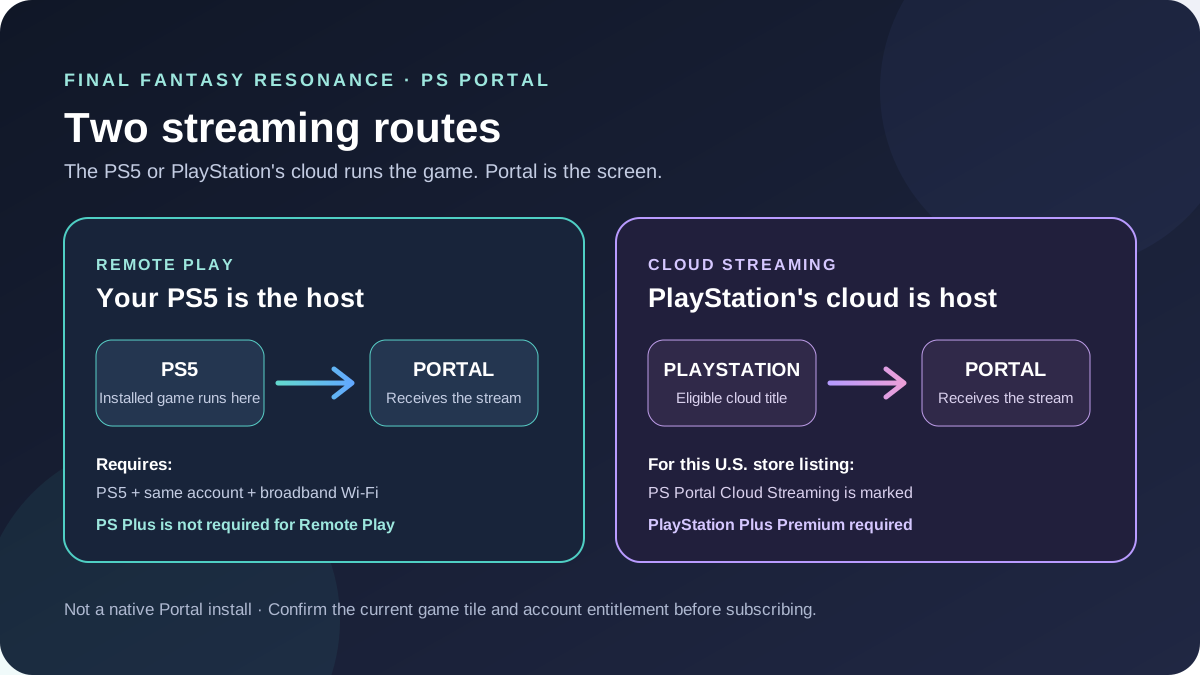
Remote Play and Cloud Streaming are different routes
The PlayStation Store’s label is title-specific: its U.S. listing says PS5 and PS Portal cloud streaming supported only with Premium. That confirms a Cloud Streaming path for the game listing. It does not mean the Portal installs or runs a PS5 game locally, and it does not tell you whether your current account sees the game through the subscription catalog or a digital-library stream.
| Route | How Final Fantasy Resonance reaches Portal |
|---|---|
| PS5 Remote Play | Your PS5 runs an installed compatible game and sends the session to Portal. Sony says Remote Play does not require PS Plus. The PS5 must be paired, online or configured for Rest Mode wake, and signed into the same account as Portal. |
| PS Portal Cloud Streaming | PlayStation’s cloud service streams an eligible PS5 title to Portal. The U.S. store listing says Premium is required for this title. Open the Portal’s Cloud Streaming catalog or game tile and confirm the current region and license prompt. |
| Native Portal install | Not a route: Portal streams games rather than installing and running a PS5 game locally. |
Sony describes Cloud Streaming as a way to play select PS5 games on Portal even when the PS5 is powered off or being used by another account. Its product page says the available catalog and digital-library titles vary by region and time. For Final Fantasy Resonance, use the current store tile as the final entitlement check rather than assuming that owning the PS5 edition automatically gives every account the same cloud option.
Set up Remote Play from your PS5
Use these steps when you want to stream the copy installed on your own PS5:
- Install the PS5 edition on the console and connect the console to the internet.
- Sign in to the PS5 and PS Portal with the same PlayStation account, then update the PS5 system software.
- On PS5, open Settings → System → Remote Play and turn on Enable Remote Play.
- If the PS5 will be in Rest Mode, open Settings → System → Power Saving → Features Available in Rest Mode. Turn on Stay Connected to the Internet and Enable Turning On PS5 from Network.
- On the Portal home screen, tap the Portal icon or press the cross button to connect to the PS5 used previously.
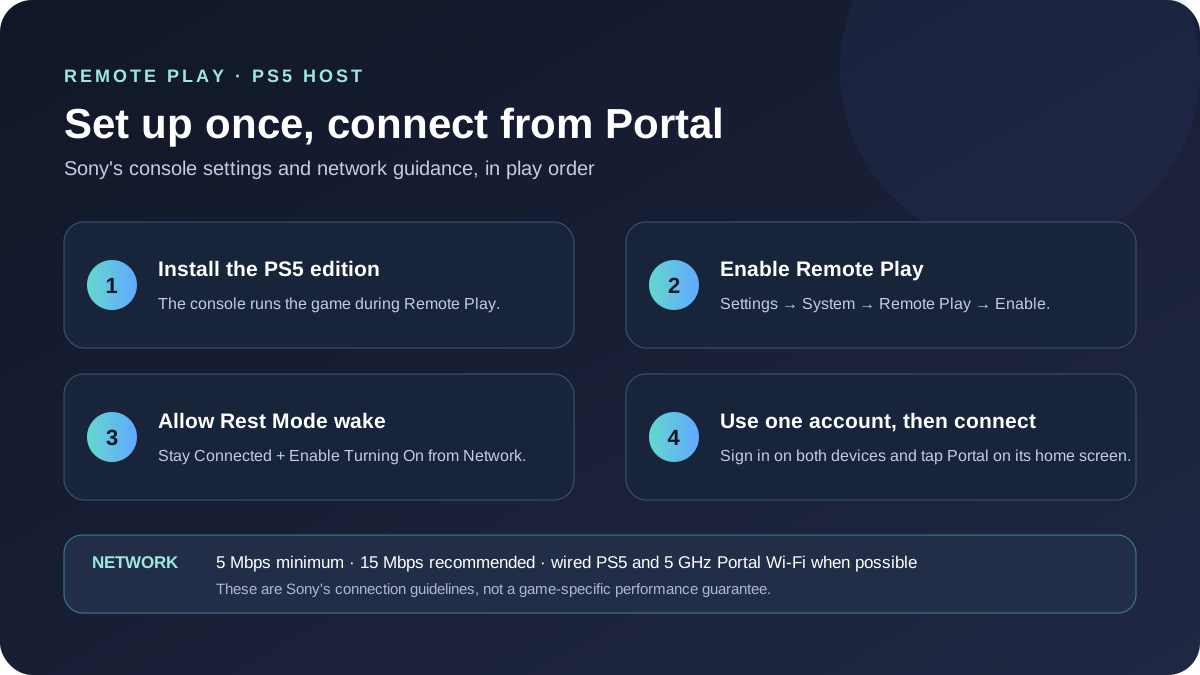
Sony lists 5 Mbps as the minimum broadband Wi-Fi speed for Portal use and recommends at least 15 Mbps for a better experience. For the Remote Play route, Sony recommends a wired internet connection for the PS5 when possible, a 5 GHz connection for Portal, and the same Wi-Fi network for both devices when the PS5 also uses Wi-Fi. These are connection guidelines, not a Final Fantasy Resonance frame-rate or latency test.
Which handheld route fits your setup?
If you already have a PS5 with the game installed, Remote Play lets Portal act as its screen and controller; PlayStation says the basic feature does not require a PS Plus plan. If you want to leave the console off, the U.S. Store lists the title for Portal Cloud Streaming with Premium, but confirm the exact tile and account entitlement before paying for a plan. Nintendo Switch 2 is a separate console edition that runs on the Switch 2 hardware rather than streaming from a PS5.
The two options do not share the same network behavior: Portal needs a stable broadband connection for either streaming route, while a Switch 2 game runs on its own console. An individual player report says the title was played on Portal through Remote Play, but that report is anecdotal and does not establish that every network or session will feel smooth. Sony also says results vary with the game and network environment.
This page is about the Portal client. The PS4 Remote Play guide covers a separate PS4-to-PS5 path; the PS Plus status guide tracks subscription catalog questions; and the Switch 2 guide covers that console edition.
Official sources
- U.S. PlayStation Store: FINAL FANTASY RESONANCE — PS5 Version and the current PS5/PS Portal Cloud Streaming Premium label; checked October 25, 2026.
- PlayStation: Portal Remote Player — Remote Play, Cloud Streaming, PS Plus requirements, and network minimum/recommendation; checked October 25, 2026.
- PlayStation Support: use Remote Play on PS Portal — PS5 setup, account, Rest Mode, and connection steps; checked October 25, 2026.
- Nintendo: FINAL FANTASY RESONANCE for Switch 2 — confirms a separate Switch 2 edition; checked October 25, 2026.
The public store and support pages establish the streaming modes and setup requirements. They do not promise a specific connection quality for an individual home network, so treat performance reports as personal experience rather than a benchmark.
Gallery
Related Articles
guides
Can You Play Final Fantasy Resonance on Steam Link?
Steam Remote Play can stream between computers, but the current game listing does not confirm Steam Link phone or TV support.
guides
Can You Play Final Fantasy Resonance on PS4?
Final Fantasy Resonance has no PS4 version in Square Enix's listed platforms. PS5 Remote Play to PS4 is separate, and title support needs confirmation.
guides
Can You Play Final Fantasy Resonance Offline on PS5, Xbox & Switch?
PS5's U.S. listing says Offline play enabled; Xbox lists Single player, and Nintendo lists Single system (1). Console startup beyond those fields is To be confirmed.
Was this helpful?
Thanks for the feedback!