
Can You Play Final Fantasy Resonance Offline on PS5, Xbox & Switch?
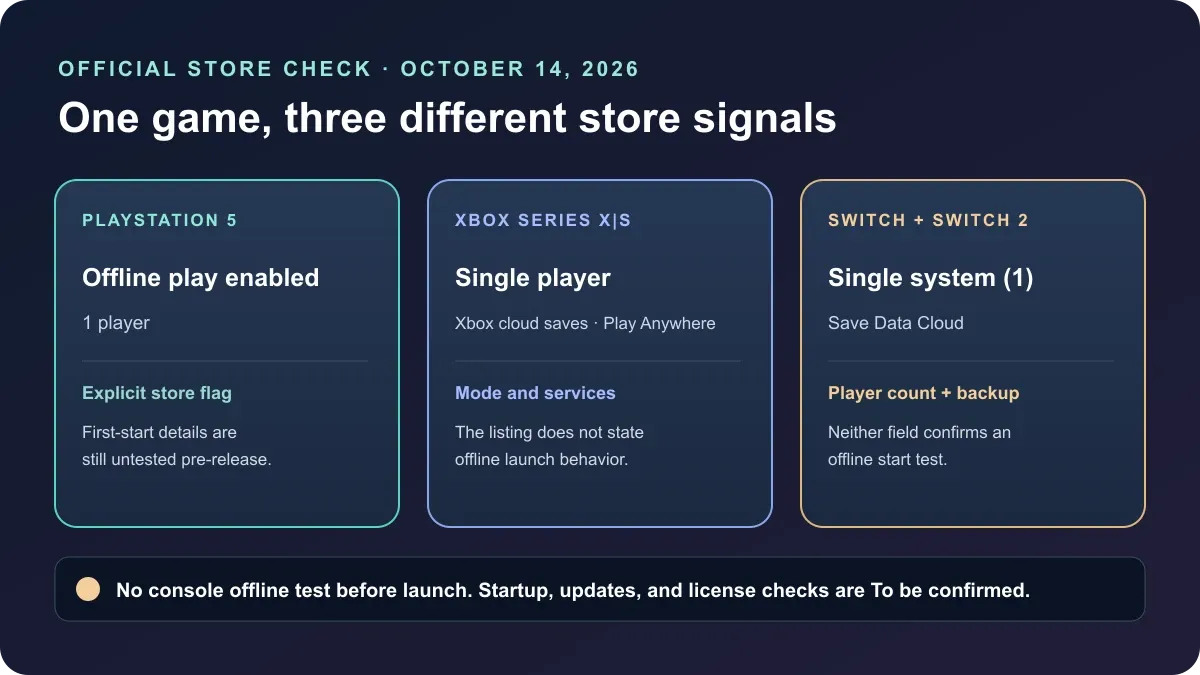
PS5's U.S. listing says Offline play enabled; Xbox lists Single player, and Nintendo lists Single system (1). Console startup beyond those fields is To be confirmed.
FAQ
Can I play Final Fantasy Resonance offline on PS5?
Does the Xbox single-player label mean it works offline?
Can I play it offline on Switch or Switch 2 without Nintendo Switch Online?
Can I take Final Fantasy Resonance on a trip without Wi-Fi?
Can you play Final Fantasy Resonance offline on PS5, Xbox, Switch, or Switch 2?
The U.S. PlayStation Store explicitly lists Offline play enabled for PS5. Xbox lists Single player, while Nintendo lists Single system (1) for Switch and Switch 2; neither field is an offline-start guarantee. Because the full game has not released, console download, first-launch, patch, and license behavior is To be confirmed.
What do the official console store pages actually say?
The checked product pages show one explicit offline-play flag on PlayStation and different player-mode or save-service fields on Xbox and Nintendo. Read each label literally: a solo-player count describes who can play, while a cloud-save feature describes a platform service. Neither substitutes for a title-specific disconnected launch test.
| Console edition and official fields | What the listing establishes—and leaves unknown |
|---|---|
| PlayStation 5 — Offline play enabled; 1 player | The U.S. listing marks the PS5 product for offline play and separately shows its player count. Exact download, first setup, update, and license-check behavior for this unreleased build is still unknown. |
| Xbox Series X|S — Single player; Xbox cloud saves; Xbox Play Anywhere | The listing confirms those three fields. It does not say whether the console edition starts offline or requires a connection at startup. |
| Nintendo Switch — Single system (1); Save Data Cloud | The listing shows one system/player and a cloud-save feature in the Nintendo Switch Online section. Whether a fresh install or later launch works without internet is still unknown. |
| Nintendo Switch 2 — Single system (1); Save Data Cloud | The Switch 2 listing shows the same player-count and cloud-save fields. Its offline startup behavior is still unknown. |
This comparison is limited to the U.S. store listings. Store fields can change before the October 22 release, so recheck the exact edition and region if offline access is important to your purchase. The separate Nintendo Switch Online guide explains what Nintendo’s cloud-save field and membership notes mean.
Does “single player” mean the console version works offline?
No. Single player or Single system (1) identifies the listed player mode or count; it does not say how the game authenticates, downloads, updates, or starts while disconnected. For a different question, the PlayStation listing’s Offline play enabled is an affirmative store flag, but the launch build has not been tested here.
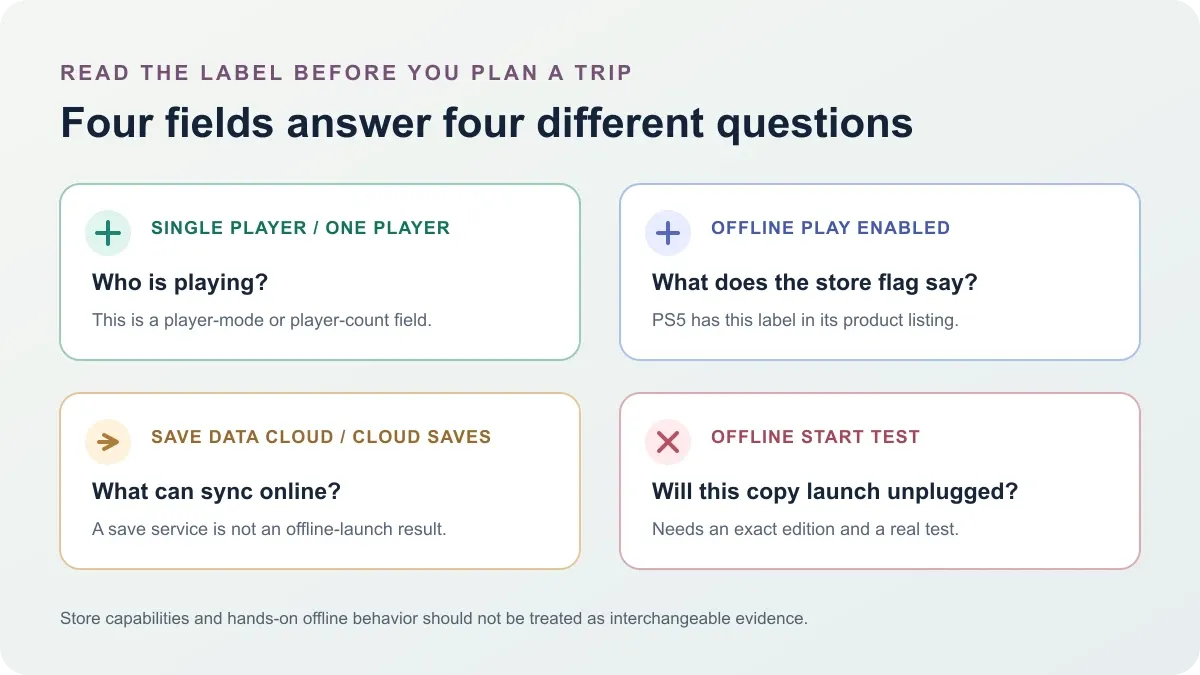
It helps to keep four kinds of evidence separate:
| Store or test field | The question it answers |
|---|---|
| Single player / one player | How many people or player slots does the listing describe? |
| Offline play enabled | Does the platform product page display an offline-play capability flag? |
| Cloud saves / Save Data Cloud | Is a remote save-sync feature listed? |
| Fresh offline launch test | Does this specific installed edition start after a full close with the device disconnected? |
The last row requires direct testing on the released game. A cloud-save label does not make internet mandatory during play, and a solo label does not prove that the software is independent of platform sign-in or license checks. The existing multiplayer guide covers the player-count question; this page is about the separate connection question.
What should you check before taking it somewhere without Wi-Fi?
There is no verified pre-release offline route for the console versions. After release, use the exact edition you intend to take, let its full download and available update finish, start it once normally, then fully close and relaunch it with the console disconnected. Record any account, license, or patch prompt instead of assuming the result applies to another platform.
- Install the correct edition while connected. Switch and Switch 2 are separate products, and PlayStation/Xbox editions have their own account and license context.
- Finish the current download and updates. This is preparation for a meaningful test, not evidence that the game currently requires or avoids a connection.
- Fully close and relaunch after disconnecting. A console already suspended with the game open does not test a fresh startup.
- Repeat after a later update if offline access matters. Record the platform, edition, game version, and the exact prompt or error. Do not generalize one device’s result to every store version.
For the PC edition, the separate Steam offline-mode guide discusses Square Enix’s Denuvo license-check notice. That PC disclosure is not evidence of how a console copy behaves.
Does Nintendo Switch Online determine whether the game plays offline?
The Nintendo U.S. listings place Save Data Cloud under the Nintendo Switch Online section and do not show a gameplay-membership requirement. That indicates a listed save service, not whether the game itself can start offline. Nintendo’s page does not settle the Switch or Switch 2 offline-launch test; that behavior is To be confirmed.
The Switch and Switch 2 store pages also state that their game saves cannot be carried between those two editions. That save boundary is separate from network access. See the Switch and Switch 2 compatibility guide for the edition and save distinction, and the Nintendo membership guide for the cloud-backup details.
Does PS5 Remote Play make the PS4 a way to play offline?
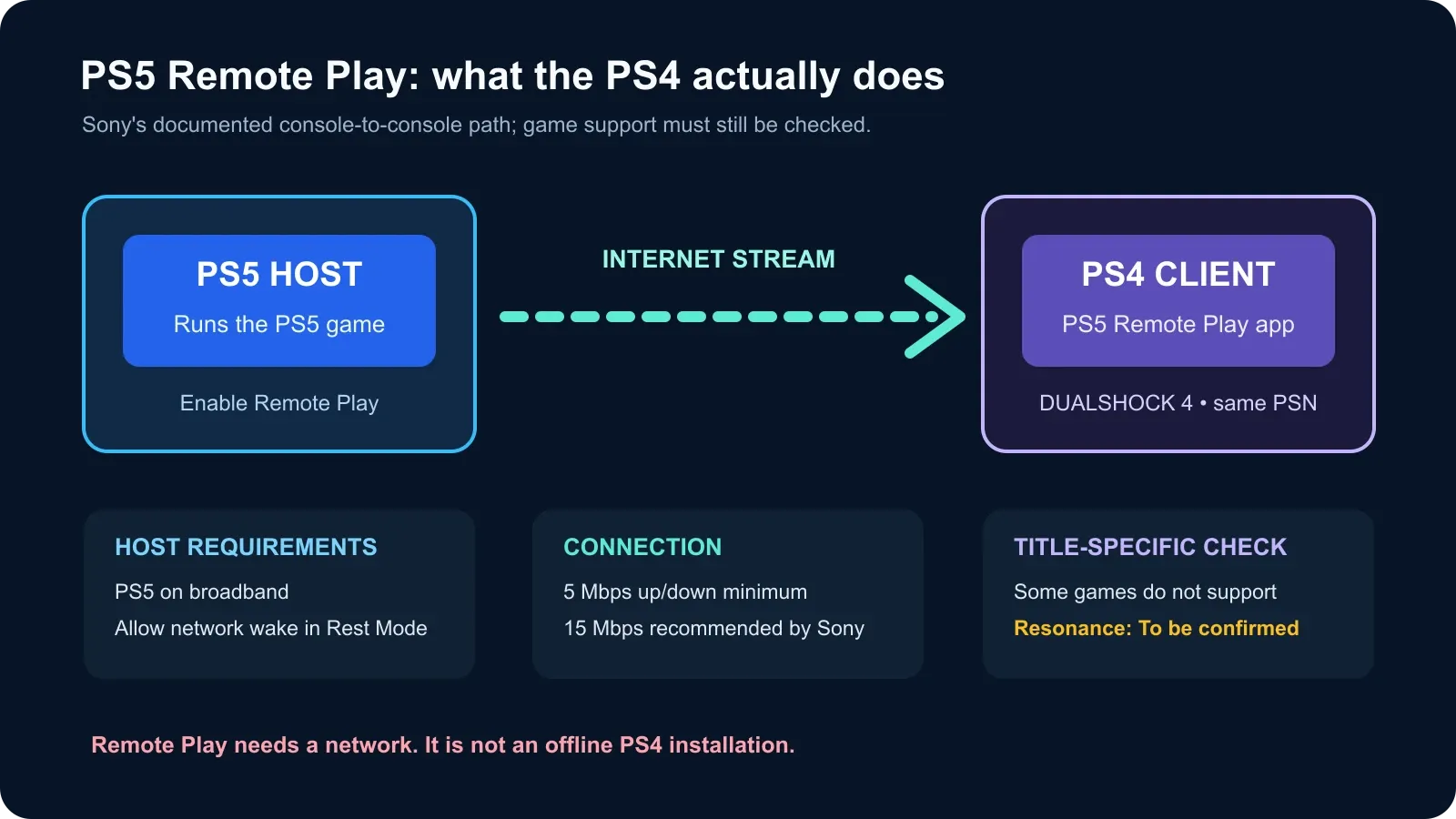
No. Sony’s PS4-to-PS5 Remote Play route streams the PS5 session to the PS4 and requires an internet connection; it is not a native PS4 install or an offline PS4 launch. Resonance-specific Remote Play compatibility is To be confirmed until the released game is tested. See the PS4 and Remote Play guide for Sony’s setup requirements.
Official sources checked October 14, 2026
The following first-party U.S. product pages were checked before the October 22 launch. Their public labels support the comparison above; none provides a hands-on test of an installed console build after disconnecting it from the internet.
- PlayStation Store: FINAL FANTASY RESONANCE — PS5 page lists Offline play enabled and 1 player.
- Xbox Store: FINAL FANTASY RESONANCE — lists Single player, Xbox cloud saves, and Xbox Play Anywhere.
- Nintendo Switch product page — lists Single system (1) and Save Data Cloud.
- Nintendo Switch 2 product page — lists Single system (1) and Save Data Cloud.
All console startup behavior beyond these store fields remains To be confirmed until official guidance or a repeatable post-release test is available.
Gallery
Related Articles
guides
How to Play Final Fantasy Resonance with Xbox Cloud Gaming
The Xbox Store lists Final Fantasy Resonance for cloud play, but requires a game purchase and an eligible Game Pass plan. Here is the access check.
guides
Can You Play Final Fantasy Resonance on PS Portal?
The U.S. PlayStation Store lists PS Portal cloud streaming for Final Fantasy Resonance with Premium. Compare it with Remote Play from your PS5.
guides
Can You Share Final Fantasy Resonance on Switch?
Both Switch editions list family-group lending. See how digital Virtual Game Card loans work, what they need, and which hardware can run each edition.
Was this helpful?
Thanks for the feedback!