
Final Fantasy Resonance File Size: Switch, Switch 2 & PC
Nintendo estimates 8.8 GB on Switch and 12.7 GB on Switch 2; Steam lists 15 GB of available PC storage. See what each figure means.
FAQ
How big is Final Fantasy Resonance on Switch 2?
Is Final Fantasy Resonance a 15 GB download on PC?
Will the Switch 2 physical edition require a large download?
How much storage does Final Fantasy Resonance need?
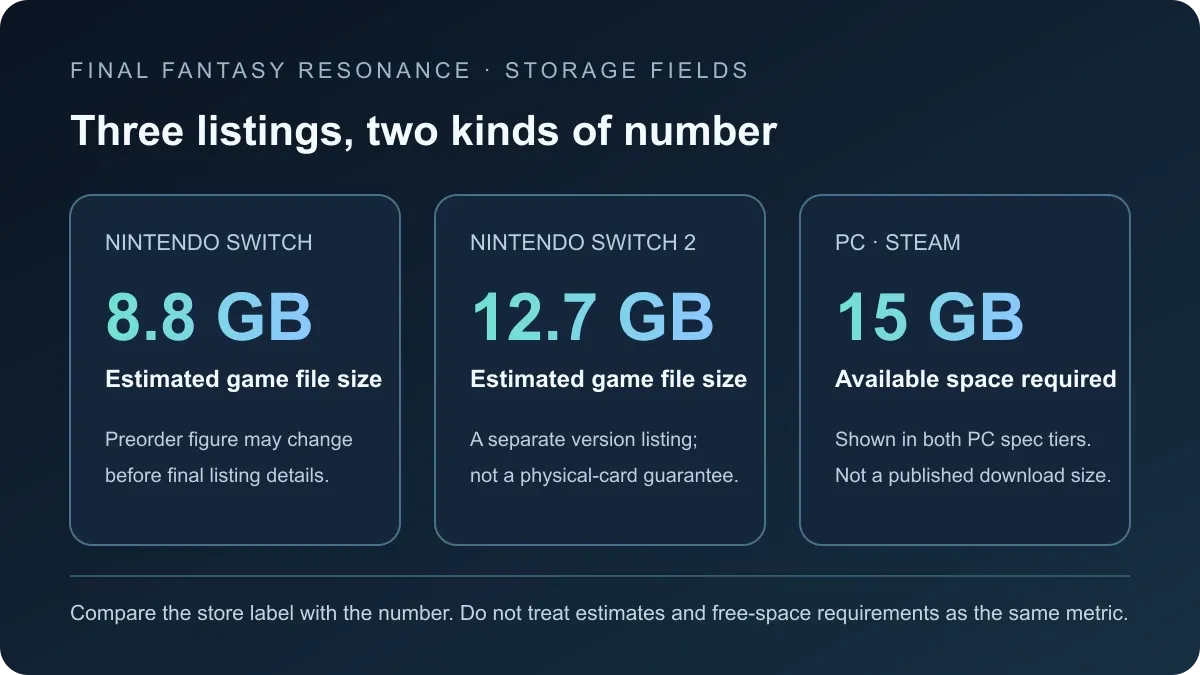
The current official listings show different kinds of storage information: Nintendo estimates 8.8 GB on Switch and 12.7 GB on Switch 2, while Steam asks PC players to have 15 GB available. The first two are estimated game file sizes; Steam’s number is a system requirement for free space, not a stated download size or final installed footprint. Nintendo warns that preorder information, including download size, may change.
Final Fantasy Resonance file size by platform
| Store listing and figure | What the field means |
|---|---|
| Nintendo Switch 8.8 GB (estimated) | Nintendo’s current estimate for the Switch game file. Preorder size information may change. |
| Nintendo Switch 2 12.7 GB (estimated) | Nintendo’s current estimate for the separate Switch 2 version. It does not confirm physical-copy download behavior. |
| PC on Steam 15 GB available space | Required free space shown in both minimum and recommended PC specs; it is not a stated download size. |
| PlayStation 5 / Xbox Series X|S To be confirmed | No platform-specific size is included here without a verified first-party figure. Check the exact console store before downloading. |
The console and PC rows are not directly interchangeable. Nintendo labels its values as estimated game file sizes, while Steam phrases its value as available space. Treat each field according to its label instead of assuming all three describe the same download or installed package.
What does Steam’s 15 GB requirement tell PC players?
Steam lists 15 GB of available space in both the minimum and recommended configurations. That confirms the published PC storage requirement, but the store does not label it as the download’s compressed size or the final size after installation. It also does not state how much space a later update may need.
For a PC install, use the figure as a published compatibility requirement: check that your drive has at least that amount available, then check Steam’s live download/install prompt when the game is available. The live installer is the relevant signal for the current package. Do not convert the system-requirement figure into a claim about how many gigabytes will be transferred over your connection.
The same distinction matters when comparing the PC requirement with Nintendo’s values. A 15 GB free-space requirement is not evidence that the PC download is larger than a 12.7 GB Switch 2 file, or that the two versions contain the same files. The official listings expose different fields and do not provide a cross-platform package comparison.
See the PC system requirements guide for the processor, memory, graphics, and target-resolution fields listed alongside Steam’s storage requirement.
How should you plan Switch or Switch 2 storage?
Use this check before you download:
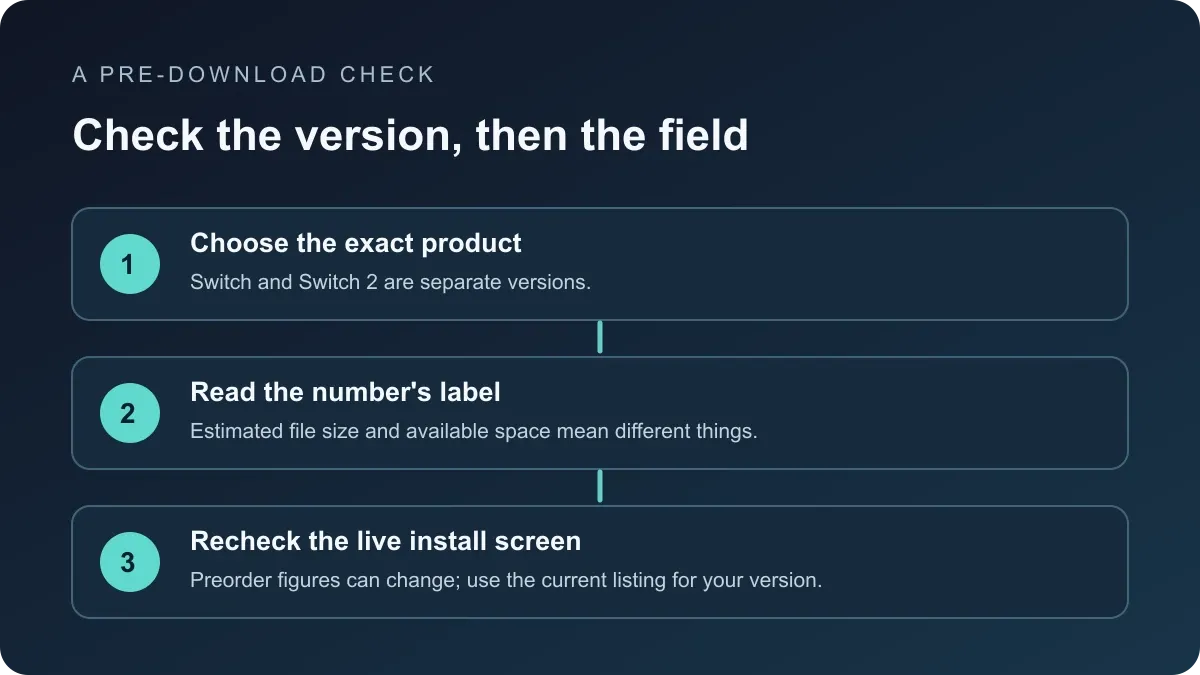
- Select the exact Nintendo version. The Switch and Switch 2 listings refer to separate versions; the official product page says to choose the version you need carefully. The two sizes do not describe an upgrade package between them. See the Switch 2 compatibility and save guide for the version boundary.
- Read the label next to the size. Nintendo currently marks 8.8 GB and 12.7 GB as estimates. Its page says preorder details, including download size, may not be finalized, so recheck the listing near release.
- Use the console’s current download screen as the final check. If the displayed size changes, follow the value shown for the version you selected. This guide does not add an unverified update allowance or claim that every region shows the same figure.
These steps avoid two common planning errors: using the Switch figure for the Switch 2 product, and treating a preorder estimate as a guaranteed final download. Neither number confirms physical-card contents, save compatibility, or an upgrade entitlement.
Does the Switch 2 physical edition need a download?
Nintendo’s current 12.7 GB estimate identifies the Switch 2 game’s listed file size. It does not establish whether a physical edition contains all game data on its card, requires an additional download, or has a different install process. Those physical-edition details are To be confirmed; check the exact retail listing and the console’s install prompt before relying on a particular amount of free space.
The physical edition guide covers the announced physical products. It does not treat Nintendo’s digital file-size estimate as proof of what is stored on a physical card.
Sources
- Nintendo Canada: FINAL FANTASY RESONANCE for Nintendo Switch — estimated sizes for both Nintendo versions and the preorder notice that download-size information may change.
- Steam: FINAL FANTASY RESONANCE — PC system requirements, including 15 GB of available space for both configurations.
Gallery
Related Articles
guides
How to Change Battle Speed in Final Fantasy Resonance
Find the battle-speed control on PC and distinguish combat speed from text and movement settings.
guides
Final Fantasy Resonance Steam Save File Location on Windows
Find the Windows Steam demo and full-game save folders and understand what a local backup does.
guides
Final Fantasy Resonance Controller Not Working on Steam: What to Check
Compare controller detection, input and in-game response in Final Fantasy Resonance without assuming a universal fix.
Was this helpful?
Thanks for the feedback!