
Final Fantasy Resonance Steam Cloud Saves: PC & Deck
Steam lists Cloud support for Final Fantasy Resonance, but the exact save files and demo sync behavior still need a release-build test.
FAQ
Will my Final Fantasy Resonance save sync from Steam PC to Steam Deck?
Does the demo save transfer use Steam Cloud?
Can I continue a Steam save on PlayStation, Xbox, or Switch?
Can you use Steam Cloud saves in Final Fantasy Resonance?
Steam currently lists Steam Cloud for Final Fantasy Resonance, so Steam Cloud is the relevant service for syncing supported saves between Steam PC and Steam Deck. The store does not identify which game files sync or confirm a release-build handoff, so the exact save behavior is To be confirmed until it can be tested in the released game.
Steam also lists Family Sharing, but that is library access for another eligible Steam Family member, not a way to merge two players’ progress. Valve says each member makes their own saved games and achievements; see the Steam Family Sharing guide for the title’s current listing and copy-count rules.
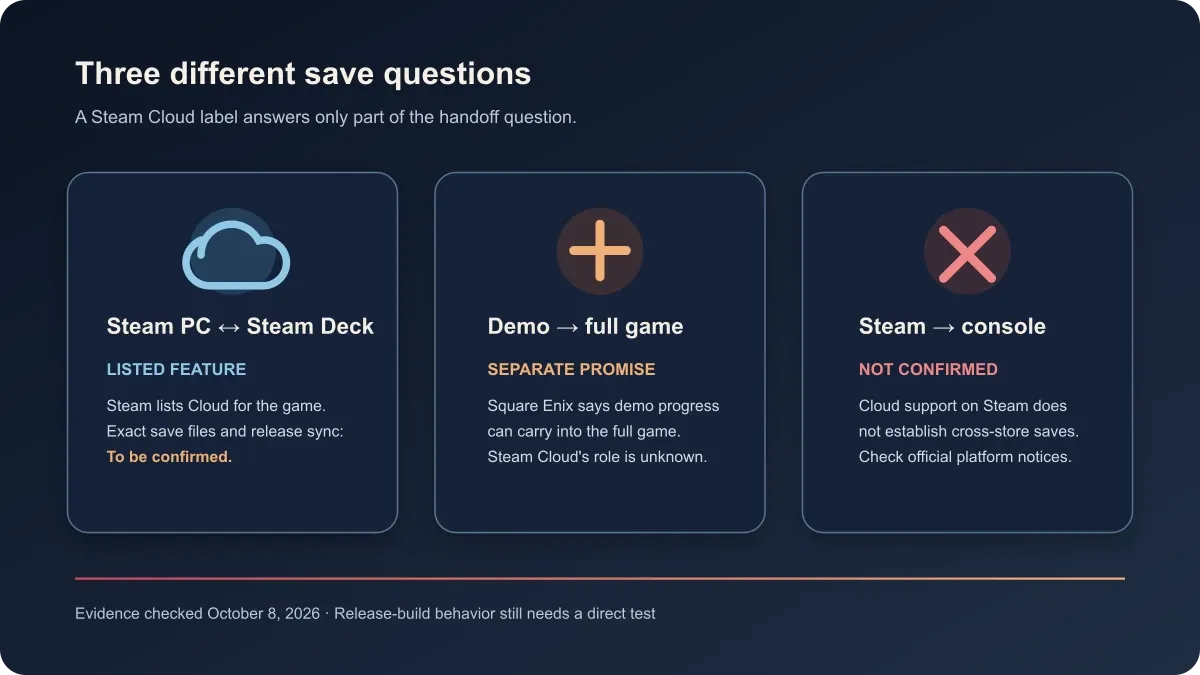
What Steam Cloud does and does not confirm
Steam’s feature label is useful evidence, but it is not a list of the files the developer chose to sync. Steam’s support documentation says developers configure which files are uploaded. It also describes a per-game cloud setting and warns that offline changes may not reach the cloud until the device reconnects.
| Save route | Evidence status |
|---|---|
| Steam PC ↔ Steam Deck | Confirmed: Steam lists Cloud for the game. To be confirmed: which Resonance files are included, whether the release build syncs on both devices, and its first-launch or conflict behavior. |
| Demo → full game | Confirmed: Square Enix says demo progress can carry into the full game. To be confirmed: whether Steam Cloud performs that transfer, whether demo saves sync between Steam devices, and any platform-specific steps. |
| Steam → PlayStation, Xbox, or Nintendo | The Steam Cloud label describes a Steam feature. No cross-store route is confirmed by the checked listing; transfer is To be confirmed. |
| Playing offline | Steam says offline edits may remain local until the device reconnects. How Resonance handles an interrupted or conflicting save in its release build is To be confirmed. |
This distinction avoids treating three different things as one promise: the storefront’s cloud feature, the game’s demo-to-full-game carryover, and a cross-platform save system. For the demo’s confirmed scope, see the Chapter 1 demo guide. For Xbox ownership and save boundaries, see the separate Xbox Play Anywhere guide.
How to prepare a Steam PC-to-Deck handoff
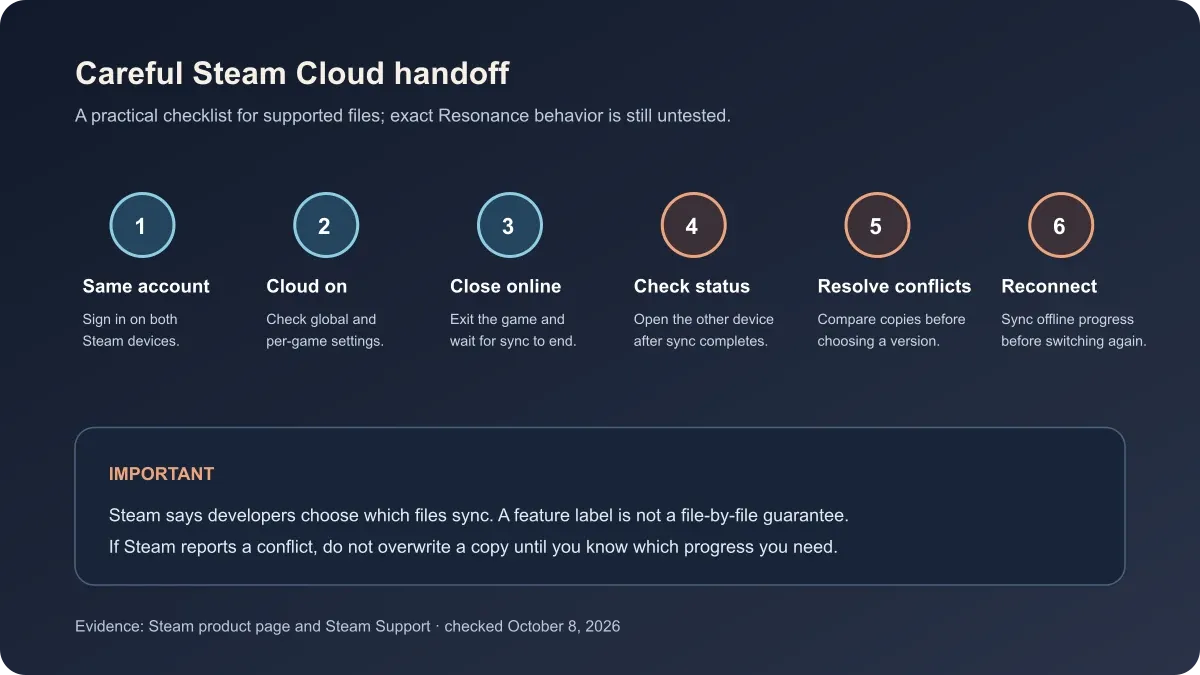
Until the released game can be tested on both devices, use this as a cautious checklist for any save Steam Cloud supports. It follows Steam’s own sync controls and conflict guidance; it is not a claim that every Resonance save file is included.
- Use the same Steam account on the PC and Steam Deck.
- In Steam settings, make sure global Steam Cloud is enabled; then check the game’s Steam Cloud option in its Library properties.
- Before changing devices, close the game while online and wait for Steam to finish syncing. Do not suspend or shut down during an active sync.
- Open the game on the second device only after Steam reports that synchronization is complete.
- If Steam displays a cloud conflict, compare the device copies and timestamps before choosing one. Do not assume the newest upload is the save you want.
- If you played offline, reconnect the original device and let it sync before opening the game elsewhere.
The Steam Deck guide covers the game’s current compatibility badge. A Verified rating describes Valve’s compatibility review; it does not document which saves the game syncs. If your main concern is playing without a network connection, the PC offline-mode guide explains the separate license-check question.
Is demo save transfer the same as Steam Cloud?
No. Square Enix’s demo notice says progress can carry into the full game, while Steam Cloud is a separate Steam service for files a developer has selected. Square Enix instructs Steam Deck players to enable Cloud Save Data for both the demo and the full game. Its instructions do not establish every PC-to-PC synchronization outcome. The Windows Steam folder location is covered separately in the save-file location guide.
Can you move a Steam save to a console version?
That is To be confirmed. Steam Cloud support does not establish a connection to a PlayStation, Xbox, or Nintendo account. Check the exact platform’s official listing and in-game save menu; do not buy a second version on the assumption that progress will carry over.
Official sources
- FINAL FANTASY RESONANCE on Steam — current Steam Cloud feature listing, checked October 8, 2026.
- Square Enix Support: demo save transfer — Steam Deck instructions, checked November 2, 2026.
- Steam Support: Steam Cloud — per-game settings, developer-selected files, offline sync, and conflict guidance.
- Steamworks: Steam Cloud — developer configuration and cloud synchronization behavior.
- Final Fantasy Resonance PS5 demo announcement — separate demo-to-full-game save carryover notice.
These sources were checked October 8, 2026. The exact save files, demo cloud behavior, and cross-store transfer remain To be confirmed pending a release-build test.
Gallery
Related Articles
guides
How to Change Battle Speed in Final Fantasy Resonance
Find the battle-speed control on PC and distinguish combat speed from text and movement settings.
guides
How to Save in Final Fantasy Resonance
Find the manual save option on the field map and use save points in towns and dungeons.
guides
How to Change Difficulty in Final Fantasy Resonance
Change Casual, Normal or Expert difficulty from the gameplay options and see what the selection screen confirms.
Was this helpful?
Thanks for the feedback!